Gadgets
Overclocking the PC
Overclocking (higher clock rate = more clock cycles per second) is a method for increasing performance of standard computer components, such as motherboard bus speed, CPU speed, or both, to their potential speeds beyond the manufacturer’s rated specifications. It is also called pushing or speed margining.
 Efforts are usually focused on processors, video cards, motherboard chipsets, and Random Access Memory (RAM). The CPU multiplier and the motherboard’s front side bus (FSB) speed [or QPI (Quick Path Interconnect), also known as Baseclock (BCLK)] is manipulated until a maximum stable operating frequency is reached.
The performance gains that can be obtained through overclocking are substantial, but a lot of consideration must be done before taking the steps to overclocking a system. It is important to know the risks involved, the steps that must be done to obtain the results and a clear understanding that results will very greatly. The primary benefit of overclocking is additional computer performance without the increased cost. [About.com]
The biggest obstacle to overclocking the computer system is heat. A large amount of heat is already produced by today’s high-speed computer systems, and overclocking a computer system just compounds these problems. Because of this, high performance cooling solutions are needed, which includes CPU heatsinks and fans, heat spreaders on memory, fans on video cards and case fans. Large copper heatsinks (good conducting metals) and a great number of case fans (for proper airflow) are recommended.
Overclocking is a risky process and doing this will void your warranty and may lower the lifespan of the selected hardware, so do your research very well about the components and the steps involved to be sure of what you are doing.
Photo Credit: NightRPStar
Bluetooth 3.0 via WiFi
 Bluetooth Special Interest Group (SIG) will officially announce Bluetooth 3.0 on April 21st. This is the new Bluetooth that will allow high-speed data transfers through the use of WiFi.
According to Michael Foley, director of the Bluetooth SIG, devices will “use the regular low-power Bluetooth radios to recognize each other and establish connections, and if they need to transfer a large file, they will be able to turn on their WiFi radios, then turn them off to save power after finishing the transfer.”
Users will hardly notice the switch of Bluetooth to WiFi, except for the sudden increase in data transfer speeds. No actual wireless network will be necessary for this. There will also be a new feature called Enhanced Power Control which will reduce the incidence of disconnects caused by movement such as placing a phone in a pocket or purse. This will be a plus for the headset and handset people.
On the technical side, according to Engadget, it is a Generic Alternate MAC/PHY (AMP) that will enable Bluetooth profiles to take advantage of 802.11 speeds. The 802.11 Protocol Adaption Layer (PAL) will enable the Generic AMP feature to be used with an 802.11 radio.
Photo Credit: Engadget
Unusual Pink Telephones
I found these four pink landline phones which to some may think it’s cool, while to others it would just be plain weird and crazy to have. Engadget mentioned two of these in their site.
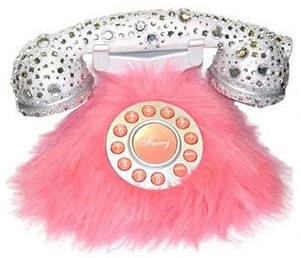
First is the pink fur and rhinestone phone. Engadget didn’t have any details about it so I had to do a search for it. I found that it costs $39.99 at Distinctivetelephones.com. It looks kind of like something from Monsters inc. but still it is kind of cute in a princessy girly sort of way.

I found another pink furry phone from Cutie Pie Stuff. Aside from the base, the handset has fur on it also so I think using this would be a bit ticklish. This one is more expensive than the other one at a price of $65.00. Golly gosh.

Another phone linked in Engadget is the High Heels Phone costing $22.00 at gadget4all.com. It looks kind of cool for a decor at home, but using it would be kind of weird. Imagine putting a shoe in your ear and talking on it. Weird, eh?

Finally, here’s one that I actually do like and might even consider buying one myself. (Do I seem crazy? Oh well.) This one is a Pink Lips Phone also from gadget4all.com. It only costs $19.00. It also looks nice as a home decor if you’re the girly/fashionista type.
I love that these are all pink, but not all of them are that appealing to have. Yup, interesting though.
Update 08/18/2014: Links to merchants above may no longer exist. However, if you want to purchase any of the above phones, a quick Google search may help you.
New Features for Next-Gen iPod Touch
Rumors about the new features of the next-generation iPod Touch have been circulating. High speed 802.11n WiFi capability is one and another is FM radio transmission. The FM transmit will enable users to stream music directly from their iPod Touch to the car stereo or home theatre system without having to use a special adapter or cables.
 In addition, it’s been revealed that there will be an addition of stereo Bluetooth-audio streaming in the Apple iPhone/iPod Touch 3.0 OS. Second-generation iPhone/iPod Touch owners will be able to activate this functionality with this latest upcoming OS.
These will definitely be great additional features for the new iPod Touch. I’m thinking about selling my old one and get the new one when it’s out. Hmm.
Photo Credit: bizmac
Netbooks… I Want One, Too.
 The Netbook, a small version of the notebook computer, has been quite popular lately. Especially now that the economy has been suffering, some people are turning to buy these less-expensive (~$200-$400ish) small-sized computers instead of the regular laptop. If what you mostly need is just to be able to use email, surf the web, and create documents, then a netbook would surely suffice.
It was Asus who first released the netbook called the Asus Eee PC in 2007. However, the roots of the netbook can be traced to Psion’s discontinued netBook line, the One Laptop Per Child (OLPC) project and the Palm Foleo.
After Asus, other computer manufacturers followed suit, including Everex, MSI, Acer, Dell, and HP. Initially, it was only the Linux operating system which was used, but now, Windows XP based models have also been released.
The Top 10 Netbooks listed by PC World on March 6th, 2009 are as follows:
- Asus Eee PC 1000HE
- Acer Aspire ONE AOD150
- Lenovo Ideapad S10
- Acer Aspire ONE
- Asus Eee PC 1000 XP
- HP Mini 2140
- Asus N10Jc
- HP Mini 1000
- Dell Inspiron Mini 9
- MSI Wind U100
Ever since the Asus Eee PC was released, I’ve always thought of getting one (the pink one specifically) so I could use it on the go. And now, I’m glad I have more options. Unfortunately, I don’t have the money to spare right now. I just love gadgets and this would surely be a lovely addition, as soon as I have the extra bucks. I can’t really make it a priority right now though. [Sigh]
Photo Credit: zieak
- ← Previous
- 1
- …
- 9
- 10
 Tech-Life in Pink