Phones
Phones That Are Confirmed to Get the Android Lollipop Software Update

Android Lollipop, the Android software version 5.0 formerly simply known as Android “L”, has been reported to have a November 3, 2014 release date. No official date has been announced yet by Google however.
The features included in the update include the following:
- A bold, colorful, and responsive UI design for consistent, intuitive experiences across all your devices
- New ways to control when and how you receive messages – only get interrupted when you want to be
- A battery saver feature which extends device use by up to 90 mins
- Use Android Smart Lock to secure your phone or tablet by pairing it with a trusted device like your wearable or even your car
- Multiple users for phones. If you forget your phone, you still can call any of your friends (or access any of your messages, photos etc.) by simply logging into another Android phone running Lollipop.
- Guest user for phones and tablets means you can lend your device and not your stuff
- New handy controls like flashlight, hotspot, screen rotation and cast screen controls
- Improved network handoffs resulting in limited interruption in connectivity. For example, continue your video chat or VoIP calls without interruption as you leave the house and switch from your home Wi-Fi back to cellular
- Even if your screen is off, you can say “OK Google” on devices with digital signal processing support such as Nexus 6 and Nexus 9
The above are just a few of the features available on the latest upcoming update. Keep in mind that not all Android devices will get the software update at the same time. Here is a list of what phones have been confirmed (or almost confirmed) to get the update:
- Google Nexus 6 will come with Android 5.0 already installed.
- Nexus 5
- Nexus 4
HTC
- HTC One M8
- HTC One M7
- Both phones will get the upgrade within 90 days of the software’s final release.
LG
- LG G3 will get the update before the end of the year (not completely confirmed)
- LG G2 will get the update in early 2015 (not completely confirmed)
Motorola
- Moto X
- Moto G
- Moto G LTE
- Moto E
- Droid Ultra
- Droid Maxx
- Droid Mini
Samsung
- Galaxy S5 will get the update by December 2014 (not completely confirmed)
- Galaxy Note 4
- Galaxy S4
- Galaxy Note 3
- Above Samsung phones not completely confirmed at this time.
References:
“Android 5.0, Lollipop”. Android.com. Retrieved October 26, 2014.
Eadicicco, Lisa (October 26, 2014). “Here Are All The Phones Confirmed To Get Google’s Massive Android Update”. Business Insider. Retrieved October 26, 2014.
BlackBerry Passport for Professionals On-the-Go
 Last Wednesday, October 1, 2014, I was able to get my hands on a BlackBerry Passport for a quick try at a demo booth at my workplace. Surprisingly, I liked the feel of the device in my hands even with its unusual dimensions of 5.04 x 3.56 x 0.36 inches and square touch display, which is wider than what other smartphones and phablets are today.
The keyboard size felt right and was easy to type on. Keyboard is a tad bit different from the original BlackBerry keyboards in their previous older phones, with the numeric, Alt, and Shift keys now found on-screen instead. The spacebar is also smaller now since it is squeezed in between the bottom row of letters. To get to the home screen, you would need to swipe up from the middle of the keyboard to the middle of the screen. This would take a little bit of getting used to. Once in the home screen, you can access the apps by swiping left on the screen.
I liked how websites looked on the web browser, definitely a huge improvement comparing to how it was on the older BlackBerry Curve or Bold for example. It displays the full desktop version of sites well. I can’t give a comparison to the browser on the Z10 or Q30 however as I haven’t personally tried them out myself on these. One nice thing to point out with using the browser on the Passport is that when you rotate the phone on its side, you can use the keyboard as a scroll bar, so that means you won’t have to cover any part of the screen with your finger while scrolling.
 The BlackBerry Passport includes an app called the BlackBerry Hub, which is where your email, SMS/MMS, BBM messages, calls/voicemails, calendar events, social media messages and notifications such as Facebook, Twitter, LinkedIn, can be consolidated in one view for easy access and response. I liked it that it gives you that convenience, except I personally wouldn’t want my personal social media accounts included in the mix.
Another built-in app is called the BlackBerry Blend, which allows you to access the contents of your device (emails, text messages, BBM messages, calendar, files) from a computer or tablet with internet access. I didn’t get to try it out though so I can’t say if the interface is good or not.
I like how documents, spreadsheets, and presentations display well on the device, so I think this, as well as the email app (BB Hub), will definitely be beneficial for professionals on the go. As accessing some sites on the internal corporate network is required for some professionals, how well the VPN works on the phone is also important. I’m not sure how it is on this phone and I’ve never used it on my old BlackBerrys before either, but it would be great if it works well. I think I’ve tried using VPN on the BlackBerry PlayBook before and I think it worked okay.
I think I’d love having this as a work phone, which is exactly what BlackBerry had in mind when creating this phone — made for corporate users.
I would still like to keep a separate personal phone though. How about you, do you see yourself using this phone?
Official BlackBerry Passport Unboxing Video
Related Article: Keep your Passport on you at all times! [Rogers RedBoard]
iPhone 6 vs Android
Apple has just released the latest in their iPhone line, the iPhone 6 and iPhone 6 Plus, last Friday, September 19, 2014. I’m not an Apple fanatic but I do enjoy playing around with Apple products. I do have an iPad, an iPod Touch, and an iPod Nano, but that doesn’t make me Apple crazy. I use the Touch and the Nano for listening to music, and the iPad was a gift which I am using right now to write this blog post. I’ve never had and I don’t think I ever will buy the iPod Touch or iPod Nano as new; I usually buy these Apple toys in “excellent used condition” mainly for a better price deal. For a phone however, I rather use an Android and wouldn’t mind paying for it brand new. Why? I think Android phones have better specifications and features than iPhones.
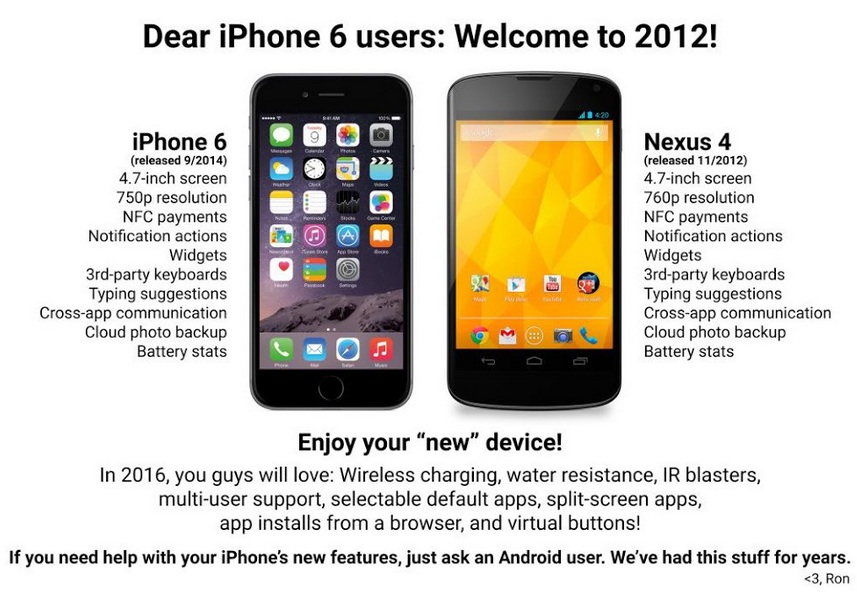
When the Android community released an infographic comparing the iPhone 6 with the Android two weeks ago, I found that funny. It is amusing to point out that many of the features in the new iPhone have already long been available to Android users. See the infographic below.
The iOS community responded with also an infographic pointing out that some features that iPhones have had for some time are just going to be released in the Android L software version. See the infographic below.
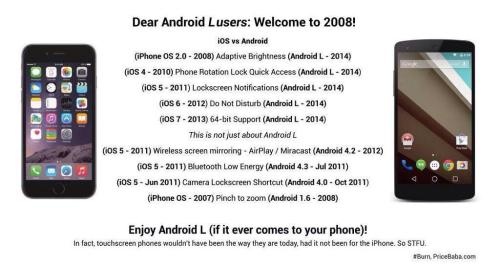
Even though both sides have come out with features ahead of the other, I still think the features that were released first in Android were more significant than those which were released first in iOS. Like for example, Cloud photo backup is a definite useful feature and it’s awesome to know Android had it first, compared to the Phone rotation lock quick access feature available in the iOS first, which I think isn’t that big of a deal. But that’s just my opinion.
What do you think?
Rooting the Samsung Galaxy S III
Rooting your phone means modifying the operating system (OS) that comes with your device enabling you to have complete control over it by giving you root or superuser permissions on the Linux-based OS widely known as the Android OS. This would be like the equivalent of “jailbreaking” the Apple iPhone.
I am no Android expert. However, let me share here the steps on how I rooted my Samsung Galaxy S III (SGH- I747M). [Reference: XDA Developers Forum]
Before starting with the actual root process, make sure all necessary drivers for the Samsung S III are installed correctly. I use Windows 7 on my laptop and when I plugged in my phone, it automatically looked for the necessary drivers. If yours does not automatically download/update the drivers, get the drivers on Samsung’s website.
Also, if you do not have ODIN yet, you will need to download and install it. ODIN is the software that is used for Samsung phones to load updates, ROMS, etc. Click HERE to go to XDA Developers Forum to find links to download ODIN.
1. Download the stock odin tar that has a rooted system image injected into it. Check for download links HERE.
2. Extract the stock_root67.tar from the .7z file you downloaded.
3. Turn on your Galaxy S3 and go to Settings>Developer Options>USB Debugging > check USB debugging > tap OK to the security warning.
4. Turn your phone off.
5. Press Volume Down + Home (Center Button) + Power until the phone boots up to Warning screen.
6. Plug your phone into the USB port on your computer.
7. Open ODIN 3.07 and make sure Auto Reboot and F. Reset Time are checked under Options.
8. Once connected, it will show the COM port. In my case, it was COM 9.
9. Check the box beside PDA and click on the PDA button then select your .tar file.
10. Click Start and wait until it completes the process and the phone reboots.
Congratulations! Now you have finished rooting your Samsung Galaxy S III!
The above process is only for getting a stock, rooted phone with no custom recovery, no plans to flash custom roms, etc. If you wish to do more with your phone, check the XDA Developers Forum for more tips.
To check and confirm that your phone is rooted, download ConnectBot, SuperUser, or BusyBox from the Play Store (formerly Android Market). If you are not able to download these, then your phone may not be rooted properly.

(Above) Screenshot of ODIN 3.07 after the successful rooting process.
Unboxing the Samsung Galaxy S III
I was due for a cellphone hardware upgrade since October 2011, but I just didn’t get it until recently. The reason why I didn’t get the upgrade right away was that I wanted to negotiate my contract first to see if I could somehow get it cheaper. I did get a few discounts for my cable/home phone/wireless bundle when I called in (internet used to be part of the bundle, but I switched over to another provider for that), and thought I would call in at a later time again to try to get a few more discounts. Anyway, since I have been very busy with everything else in my life, I didn’t get a chance to call in again. Now, the Samsung Galaxy S III (S3) is out, and I figured, oh well, just go ahead with it and whatever you currently pay for, just renew the 3-year contract.
I picked up my 32GB Marble White Samsung Galaxy S III on July 3rd, and was in love with it when I got it (currently, the other colour option is Pebble Blue). I was a bit hesitant before that to switch to an Android, since I have been a BlackBerry user for over two years and I felt I did not want to part with my BBM and BlackBerry keyboard. Anyway, I’m fine with it now, although I haven’t actually started using it.
See below for the photos of the unboxing of my Samsung Galaxy S III. I forgot to take a photo of the back of it before I got it armored. Included is a photo of the back of my phone after I got a pink Ghost Armor [www.ghost-armor.com] for it (thanks to Steve L. at the Scarborough Town Centre location for the discount).
The Samsung Galaxy S III is the flagship Android smartphone of Samsung Electronics released in 2012. Like its predecessor, the Samsung Galaxy S II, the S III is a touchscreen-based, slate-sized smartphone, with a significant addition of software features, expanded hardware, and a redesigned physique. In particular, it employs an intelligent personal assistant (S Voice), eye-tracking ability, wireless charging, and increased storage. Depending on countries, the 4.8-inch (120 mm) smartphone comes with different processors and RAM capacity, and 4G LTE support.
- ← Previous
- 1
- 2
- 3
- …
- 5
- Next →
 Tech-Life in Pink