Tech
iPhone 3GS vs iPhone 3G
As far as I can recall, a couple of people have asked me what’s the difference between the iPhone 3G and iPhone 3GS. My answer? The iPhone 3GS is faster (S is for speed!). And it also has the Compass feature. Okay, not such a good answer, eh? I should’ve expected this question to come up at any time and should’ve taken note of the things that make the 3GS better than the 3G.
According to Apple, iPhone 3GS is “the fastest, most powerful iPhone yet. Now with built-in video camera, Voice Control, longer battery life, and more.”
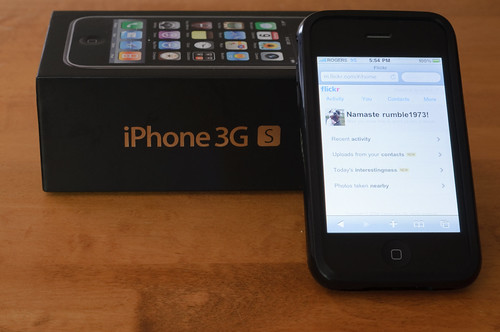 The 3GS camera is 3 megapixels, has autofocus, and video recording. On the other hand, the 3G has only 2 megapixels. Other new features of the 3GS include improved performance (faster!), voice control, and compass. Five other features that come with the latest version software (3.0 and later) include Cut, Copy & Paste, Messages, Spotlight Search, Landscape Keyboard, and Voice Memos.
Battery life for the 3GS is also better with the following differences: Talk time is up to 12 hours on 2G (compared to 10 hours on the 3G), WiFi internet use up to 9 hours (compared to 6 hours on 3G), audio playback is up to 30 hours (compared to 24 hours on 3G), and video playback up to 10 hours (compared to 7 hours on 3G).
Those are basically the differences between the two. Oh and just a note, by looking at the two, there’s no physical difference really. To distinguish between the two, you can take a look at the back. The iPhone label at the back for the 3G is in black, while the 3GS is in chrome just like the Apple logo.
To learn more about how to do everything on the iPhone, go HERE.
Photo Credit: CGehlen
The GSM Network
GSM (Global System for Mobile communications: originally from Groupe Spécial Mobile) is the most popular standard for mobile phones in the world. Its promoter, the GSM Association, estimates that 80% of the global mobile market uses the standard. GSM is used by over 3 billion people across more than 212 countries and territories. Its ubiquity makes international roaming very common between mobile phone operators, enabling subscribers to use their phones in many parts of the world. GSM differs from its predecessors in that both signaling and speech channels are digital, and thus is considered a second generation (2G) mobile phone system. This has also meant that data communication was easy to build into the system. [Wikipedia]

Registering a handset in the GSM network works this way– The handset listens for a SID (System Identity) being broadcasted by the closest BTS (Base Transceiver Station) a.k.a. the tower. Once it receives a SID, the handset transmits its IMEI (International Mobile Equipment Identity) number and MIN (Mobile Identity Number). It goes through the BSC (Base Station Controller) which determines whether the transmission is voice or data. The BTS and BSC combined is called the BTS (Base Station Subsystem). (The TRAU (Transcoding Rate Adaption Unit) which isn’t usually identified, also exists to provide repeater functionality to maintain signal strength.)
It then goes to the MSC (Mobile Switching Centre) which authenticates, validates, and locates the subscriber. It checks the HLR (Home Location Register) which is the database of the customer’s SIM services (i.e. SMS, Voicemail, Long distance, Call display, etc.). Once it confirms the subscriber services, it goes back to the handset the same way, but all these happen so fast that it becomes seamless to the subscriber.
Another component in the network is the GMSC (Gateway Mobile Switching Centre) which routes calls targeted to another carrier’s wireless network or the PSTN (Public Switch Telephone Network). There is also a VLR (Visitor Location Register) which is used for load balancing as it stores subsets of information from the HLR when the subscriber is not in his home area.
 When roaming, there also is the EIR (Equipment Identity Register) which is a database of all blacklisted equipment (though this one is rarely used these days already). There is also the AuC (Authentication Centre) which stores the private key for SIM authentication. Both of these are connected to the MSC.
For data services, a.k.a. GPRS (General Packet Radio Service), the SGSN (Serving GPRS Support Node) acts as the MSC. It then goes to the GGSN (Gateway GPRS Support Node), then depending on the APN (Access Point Name), it will go out to the Internet in varied ways.
There are three APNs commonly used. Goam.com, which is used for plain text browsing, accesses the Internet via a WAP Gateway. Internet.com, which is used for HTML browsing, accesses the Internet via a NAT Server. Thirdly, Media.com, which is used for multimedia messaging, accesses the Internet through a WAP Gateway, then a MMSC (Multimedia Service Centre) or SMTP server (for email).
These are all the network components in the GSM network which are nice to know especially if you work in the telecommunications industry.
Photo Credit: Atomic Taco
SFN and OFDM
July 28th, 2008 questions and answers in my Advanced RF/Wireless Techniques class.
1. What is SFN?
SFN, or Single Frequency Network, is a broadcast network where several transmitters simultaneously send the same signal over the same frequency channel.
2. Why does OFDM enable SFN technique?
OFDM, or Orthogonal Frequency Division Multiplexing, which is used in wideband digital broadcasting, enables SFN technique in order to have efficient utilization of the radio spectrum, allowing a higher number of radio and TV programs in comparison to traditional multi-frequency network (MFN) transmission. An SFN may also increase the coverage area and decrease the outage probability in comparison to an MFN, since the total received signal strength may increase to positions midway between the transmitters.
SFN considerably improves the utilization of frequency bands and channels as well as energy balance of digital transmitters. The signal coverage of a certain area can be provided by a number of transmitters, transmitting the multiplex of digital television or radio signals in the identical frequency channel. Their partial signal contributions in the reception point not only do not interfere, under certain circumstances then even improve the reception.
3. What are the benefits of broadcasting using SFN?
The benefits of broadcasting using SFN are:
- Improvement in the utilization of frequency bands and channels in the available spectrum,
- Improved coverage area, and
- Decreased outage probability.
—–
This is definitely just a random post.
Antenna Selection
In choosing an antenna you want to use for transmission or extending a wireless network range, there are several things you need to determine. I found this list of questions somewhere on the internet (which I copied down when I was trying to decide on an antenna for purchase, but forgot to take note of the source) that will help in the antenna selection process:
- What is the operating frequency range of the system?
- How much gain is required?
- What kind of radiation pattern is desired?
- What is the maximum allowable VSWR?
- What polarization is required?
- What type of connector interface is required?
- How much power will the antenna have to handle?
- Where will the antenna be mounted?
- Is a radome required?
- What is the lifetime of the antenna?
Yup, that’s it.
 Photo Credit: michaelstyne
Custom Building a PC
 When you want a powerful PC, one that is able to do multiple heavy tasks, it is probably a good idea if you custom build your own, since you could make it more powerful and at the same time cheaper than those ready-to-use PCs. Okay, I understand that not all people are that tech-savvy to be building their own PC, but if you somehow like taking risks, maybe you could try doing it, but of course it would help if you had a tech-savvy friend around.
The last PC I built had the following components, which are great for heavy-duty video making and graphic design:
- Case: Antec Three Hundred ATX
- Motherboard: Gigabyte UltraDurable 3 (GA-MA78GM-US2H)
- Processor: Intel Core i7 920 CPU (2.93 GHz & 2.66 GHz Quadcore)
- Heat Sink Fan: Scythe Zipang SCZP-1000 CPU HSF
- Memory: Corsair DDR3 6GB Kit Core i7 compatible
- Hard Drive: WD Velociraptor 300GB HDD
- Video Card: ASUS ATI Radeon HD 4770 PCI-E
- Power Supply: PC Power & Cooling 610W PSU
And of course, monitor(s), keyboard, and optical mouse are additional things you must have. Be sure your monitors have DVI input. I liked having to use two 24-inch monitors. If you have to use two monitors, you would also need to install the correct drivers so you would be able to use the two as one big screen, and not two separate screens.
Now if for some reason you needed to have two PCs, you would also need a KVM (Keyboard/Video/Mouse) switch, plus additional cables. This would allow you to switch from one PC to another and view it on the same two screens.
There are resources on the internet which you could utilize as you build your own PC, so refer to them if you ever decide to build one of your own.
Photo Credit: NightRP Star
 Tech-Life in Pink