Della: Dell for Women
 Della is Dell’s new micro-site for women. Notebooks and netbooks are being featured and geared towards women. A lot of design choices for the laptops are being featured. As I looked through them, I was expecting to see something in the pink motif, and of course there was.
There is a tech page included featuring Seven Unexpected Ways a Netbook Can Change Your Life. Kind of interesting, but I wouldn’t exactly say they’re “tech tips”. [UPDATE 05/14/09: Article was modified to ‘Five Ways to Use a Netbook’ after many ladies gave not-so-good feedback about the content they had.]
Anyway, see the site for yourself: click HERE.
Update 10/22/10: The Della micro-site no longer exists since quite awhile ago. I just haven’t put an update on this post.
Omni Antenna vs. Directional Antenna
An Omni-directional antenna is usually described as a low-gain, dipole-like antenna, while Directional antenna is one with a predominant beam in one direction and significantly more gain. Using another antenna, whether indoor or outdoor, is one of the options you have for extending your wireless (WiFi) network.
An antenna gives the wireless system three fundamental properties: gain, direction and polarization. Gain is a measure of increase in power. Gain is the amount of increase in energy that an antenna adds to a radio frequency (RF) signal. Direction is the shape of the transmission pattern. As the gain of a directional antenna increases, the angle of radiation usually decreases. This provides a greater coverage distance, but with a reduced coverage angle. The coverage area or radiation pattern is measured in degrees. These angles are measured in degrees and are called beamwidths. [Cisco]
In deciding which of these two antennas you should be using, you must consider the range that you want to achieve as well as the obstructions/interferences that are present. Like for example, would you want to focus the signal to one direction only, that is towards the other building, or to two buildings on opposite sides of the central one? If to only one building, then maybe you could consider a directional antenna, otherwise, an omni might be more practical. Also, consider the walls that might be obstructing the area you wish to reach with your wireless signal. If there are too many obstructions, you might also consider putting up wired connections in addition to the wireless part.
Do look and compare the gain, the direction, and polarization of various antennas if you do wish to purchase one and evaluate if it is what you wish to achieve for extending the range of your wireless network.
 Photo Credit: johnny2love
Extending the Range of a Wireless Network
Extending the wireless range of your existing network is possible through the use of a wireless repeater. It may also be that your existing router may just need a firmware upgrade which will enable other features of the hardware, such as an increase in the router’s transmission strength.
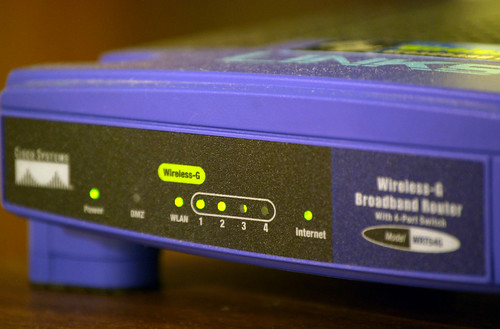 An ordinary wireless router can be used as a repeater bridge with a third-party firmware such as DD-WRT. DD-WRT is a Linux-based firmware released under the terms of the GPL for many (WiFi) IEEE 802.11a/b/g/h/n wireless routers based on a Broadcom or Atheros chip reference design. DD-WRT offers many advanced features not found in the OEM firmwares of these devices, or even the firmware available for purchase from Sveasoft. [dd-wrt.com/wiki]
To know if a specific router can be used as a repeater/bridge, a list of supported devices is available on the DD-WRT website.
However, using a repeater bridge for your wireless network has the downside for a client of not having the optimum speed in accessing the internet (if connected via the repeater). A repeater bridge will sacrifice half of the bandwidth available from the primary router for clients wirelessly connected. This is the result of the repeater taking turns talking to two partner devices, and having to relay traffic between them.
 Other things to keep in mind to improve your wireless network are positioning your wireless router in a central location and moving it away from obstructions such as walls and metal objects. A router’s antenna can also be replaced with a better one which has a better dBi gain. You can also change the wireless channel used to minimize interferences.
Photo Credits: webhamster, tiseb
“Tweeting Intern” Needed at Pizza Hut
 I just read this article on CNET today that Pizza Hut in Dallas, Texas (company headquarters) is looking for a summer intern who uses Twitter. On the Pizza Hut homepage, you will find: “Apply to be the First Pizza Hut Twintern.”
The job description says:
 The intern will act as a fully integrated member of the PR team and will focus on new and emerging social media, such as Twitter, Facebook and others. This is a full-time paid internship, and Pizza Hut will work with you and your school to support academic credit, if applicable.
How cool is that?!
They’re looking towards hiring those students specializing in marketing, journalism, communications, public relations, or any related course study. If the job description fits you (and you’re in Texas or planning to go there), better hurry in applying because deadline is May 3rd, 2009.
I’m not in any way in those fields, but it still would have been a cool opportunity to apply for if I was. Maybe other companies should try employing this kind of position, too. Hey, after all, social media is very much used everywhere now and this would surely help in their marketing.
Overclocking the PC
Overclocking (higher clock rate = more clock cycles per second) is a method for increasing performance of standard computer components, such as motherboard bus speed, CPU speed, or both, to their potential speeds beyond the manufacturer’s rated specifications. It is also called pushing or speed margining.
 Efforts are usually focused on processors, video cards, motherboard chipsets, and Random Access Memory (RAM). The CPU multiplier and the motherboard’s front side bus (FSB) speed [or QPI (Quick Path Interconnect), also known as Baseclock (BCLK)] is manipulated until a maximum stable operating frequency is reached.
The performance gains that can be obtained through overclocking are substantial, but a lot of consideration must be done before taking the steps to overclocking a system. It is important to know the risks involved, the steps that must be done to obtain the results and a clear understanding that results will very greatly. The primary benefit of overclocking is additional computer performance without the increased cost. [About.com]
The biggest obstacle to overclocking the computer system is heat. A large amount of heat is already produced by today’s high-speed computer systems, and overclocking a computer system just compounds these problems. Because of this, high performance cooling solutions are needed, which includes CPU heatsinks and fans, heat spreaders on memory, fans on video cards and case fans. Large copper heatsinks (good conducting metals) and a great number of case fans (for proper airflow) are recommended.
Overclocking is a risky process and doing this will void your warranty and may lower the lifespan of the selected hardware, so do your research very well about the components and the steps involved to be sure of what you are doing.
Photo Credit: NightRPStar
 Tech-Life in Pink