Tech
BlackBerry Passport for Professionals On-the-Go
 Last Wednesday, October 1, 2014, I was able to get my hands on a BlackBerry Passport for a quick try at a demo booth at my workplace. Surprisingly, I liked the feel of the device in my hands even with its unusual dimensions of 5.04 x 3.56 x 0.36 inches and square touch display, which is wider than what other smartphones and phablets are today.
The keyboard size felt right and was easy to type on. Keyboard is a tad bit different from the original BlackBerry keyboards in their previous older phones, with the numeric, Alt, and Shift keys now found on-screen instead. The spacebar is also smaller now since it is squeezed in between the bottom row of letters. To get to the home screen, you would need to swipe up from the middle of the keyboard to the middle of the screen. This would take a little bit of getting used to. Once in the home screen, you can access the apps by swiping left on the screen.
I liked how websites looked on the web browser, definitely a huge improvement comparing to how it was on the older BlackBerry Curve or Bold for example. It displays the full desktop version of sites well. I can’t give a comparison to the browser on the Z10 or Q30 however as I haven’t personally tried them out myself on these. One nice thing to point out with using the browser on the Passport is that when you rotate the phone on its side, you can use the keyboard as a scroll bar, so that means you won’t have to cover any part of the screen with your finger while scrolling.
 The BlackBerry Passport includes an app called the BlackBerry Hub, which is where your email, SMS/MMS, BBM messages, calls/voicemails, calendar events, social media messages and notifications such as Facebook, Twitter, LinkedIn, can be consolidated in one view for easy access and response. I liked it that it gives you that convenience, except I personally wouldn’t want my personal social media accounts included in the mix.
Another built-in app is called the BlackBerry Blend, which allows you to access the contents of your device (emails, text messages, BBM messages, calendar, files) from a computer or tablet with internet access. I didn’t get to try it out though so I can’t say if the interface is good or not.
I like how documents, spreadsheets, and presentations display well on the device, so I think this, as well as the email app (BB Hub), will definitely be beneficial for professionals on the go. As accessing some sites on the internal corporate network is required for some professionals, how well the VPN works on the phone is also important. I’m not sure how it is on this phone and I’ve never used it on my old BlackBerrys before either, but it would be great if it works well. I think I’ve tried using VPN on the BlackBerry PlayBook before and I think it worked okay.
I think I’d love having this as a work phone, which is exactly what BlackBerry had in mind when creating this phone — made for corporate users.
I would still like to keep a separate personal phone though. How about you, do you see yourself using this phone?
Official BlackBerry Passport Unboxing Video
Related Article: Keep your Passport on you at all times! [Rogers RedBoard]
Mink – The 3D Makeup Printer
I like makeup but I wouldn’t exactly spend a ton of money on it.
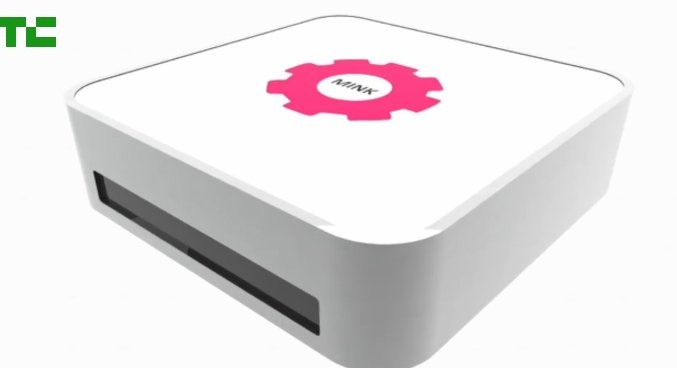 A few months ago in May, one of the product innovations that was presented at the TechCrunch Disrupt 2014 conference was Mink. Mink is a 3D makeup printer invented by Grace Choi, 31, a Harvard Business School graduate. Basically, it involves using a regular home printer with FDA-approved ink to make eyeshadow, lipstick, or nail polish in any shade you can imagine, or copy from the internet. So, what this means is consumers will have a way to get inexpensive makeup!
With this idea, Mink could potentially disrupt the entire beauty market. Choi wants to make a beauty revolution first, and a business second. She wants to be able to teach the world how to make its own 3D makeup printers from home.
She’s definitely got a pretty cool idea and I wouldn’t mind trying this out myself.
Watch the videos about Mink below:
Print Your Own Makeup at Home with Mink – Disrupt 2014
Hack Your Own Mink – Happy Minking! 😉
Photo Credit: TechCrunch
iPhone 6 vs Android
Apple has just released the latest in their iPhone line, the iPhone 6 and iPhone 6 Plus, last Friday, September 19, 2014. I’m not an Apple fanatic but I do enjoy playing around with Apple products. I do have an iPad, an iPod Touch, and an iPod Nano, but that doesn’t make me Apple crazy. I use the Touch and the Nano for listening to music, and the iPad was a gift which I am using right now to write this blog post. I’ve never had and I don’t think I ever will buy the iPod Touch or iPod Nano as new; I usually buy these Apple toys in “excellent used condition” mainly for a better price deal. For a phone however, I rather use an Android and wouldn’t mind paying for it brand new. Why? I think Android phones have better specifications and features than iPhones.
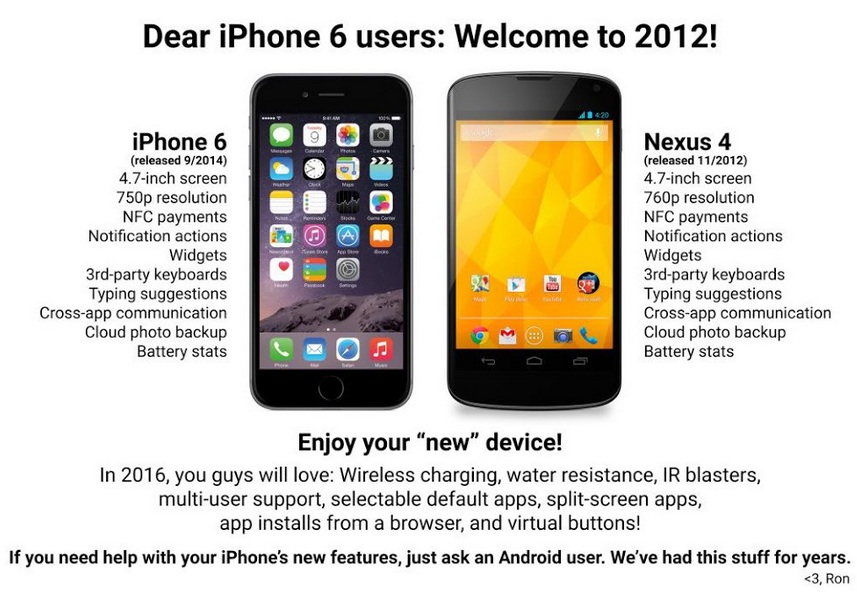
When the Android community released an infographic comparing the iPhone 6 with the Android two weeks ago, I found that funny. It is amusing to point out that many of the features in the new iPhone have already long been available to Android users. See the infographic below.
The iOS community responded with also an infographic pointing out that some features that iPhones have had for some time are just going to be released in the Android L software version. See the infographic below.
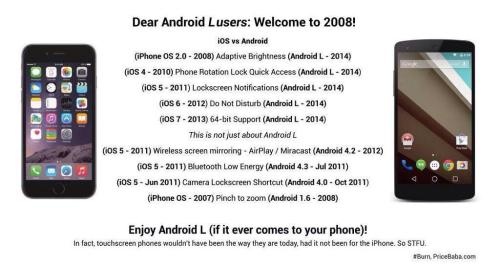
Even though both sides have come out with features ahead of the other, I still think the features that were released first in Android were more significant than those which were released first in iOS. Like for example, Cloud photo backup is a definite useful feature and it’s awesome to know Android had it first, compared to the Phone rotation lock quick access feature available in the iOS first, which I think isn’t that big of a deal. But that’s just my opinion.
What do you think?
Tennis, Anyone?
Today is the last day of the 2014 U.S. Open Tennis Championships. Congratulations to Serena Williams who won the Women’s Singles title, beating Caroline Wozniaki yesterday Sunday, September 7th. Congrats go out as well to the other title winners. Hopefully, one day, my fellow Canadians Eugenie Bouchard and Milos Raonic will win as well.
 So, speaking of tennis, I started playing tennis only this year, thanks to my co-workers one Friday in January; and ever since that time, I’ve been hooked. My only experience in tennis before this time was a short “game” with my best friend back in high school, and also playing the Nintendo Family Computer tennis video game when I was a kid. Game is in quotes since it barely counted as a game because I remember we barely could even hit the ball properly nor get it to one another’s side of the court.
The racquet that I currently use is a 2011 Babolat AeroPro Drive racquet loaned to me by my co-worker. Even after several months of playing, I still have not gotten my own racquet since I haven’t found one that I liked at the price point I have in mind. Anyway, after much thought, I’ve decided that I should just probably get the newer version of the Babolat AeroPro Drive racquet since I have gotten used to it and I like how it feels when I play. Oh and apparently, this is the same racquet that Genie Bouchard uses, so hopefully one day I get to play as well as her — wishful thinking!
 There are some new technologies that have been developed to help tennis players in assessing and improving their game. One of these is the Babolat Play Pure Drive racquet. The racquet has integrated sensors inside the handle which collects your swing, motion, and other information and gives out an analysis of your game. The racquet would be nice to have, but I personally wouldn’t buy it due to a higher price of about $450 compared to regular racquets ranging from $100-$200 which are good enough for a beginner.
 Another new gadget is the Sony Smart Tennis Sensor which is a small coin-sized device which you can attach to the base of a tennis racquet. Same as the integrated sensor in the Babolat Play Pure Drive, it gathers data on serves, ball speed, accuracy, and other information and will give you an analysis of your game. All these information can be displayed real-time on your smartphone via Bluetooth. This one, however, will not yet be available until January 2015 with a price of about $200.
The above are just a couple of the latest technologies that are available out there for tennis players. But really, if you’re not planning to be a tennis professional, I personally don’t think it’s really necessary to have these. I wouldn’t mind receiving any of these as a gift though!
By the way, here’s a picture of me with Roger Federer.

I wish.
“shomi” the new way to watch TV for Canadians
 Last week on August 26, 2014, Rogers Communications and Shaw Communications unveiled a new subscription video-on-demand service similar to Netflix, available only in Canada. The service called shomi (pronounced ‘show me’) will be launched in November of this year, initially for Rogers and Shaw cable and internet subscribers only at a suggested monthly retail price of $8.99. shomi will have both TV and movie offerings, with 30% Canadian content.
The service will be accessible online (desktops/laptops), on tablets, smartphones, Xbox 360, and set-top-boxes. For those people who do not have a TV subscription, or those who would like access to more TV and movie content, this is something worth a try. And if you already have Netflix, you may also want to subscribe to this as it will have content that is not available on Netflix.
Will you be subscribing to shomi?
Disclosure: I work for Rogers, however, all the opinions on this site are my own and do not in any way reflect my employer’s.
 Tech-Life in Pink